




















How do you play Geometry Vibes X Ball?
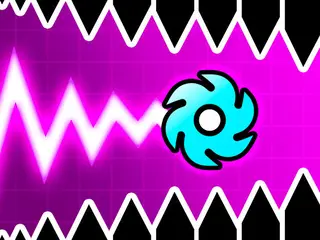
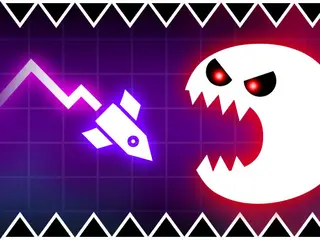
Goal: Fly your ball through each level without touching the obstacles, traps and spinning gears, and reach the end. Up to four players can race on one keyboard.
- Pick a mode on the start screen: Classic, Endless, Challenge or Race (2P, 3P or 4P).
- Hold the left mouse button or the Up Arrow to fly up.
- Let go to dive down.
- Weave between the obstacles, traps and gears. Touching one ends the try.
- Reach the end of the level to clear it.
What are the controls for Geometry Vibes X Ball?
| Input | Action |
|---|---|
| Hold left mouse button or Up Arrow | fly up |
| Release | dive down |
| Up Arrow, H and L | the other players in 2, 3 and 4 player modes |
Tips for Geometry Vibes X Ball
- Use short taps instead of long holds in narrow gaps, so the ball does not shoot too high.
- Watch where the next gap is, not where your ball is right now.
- In multiplayer, each player has one key (Up Arrow, H or L), so sit where you can reach yours.
- Endless mode shows your best distance in metres, so you can try to beat it.
Guide written by Gamezylo from the developer’s description, instructions and screenshots of the game, Oct 7, 2026. If the game plays differently, follow what it shows on screen.
Game details
- Genre
- One-button obstacle flyer, Arcade, 2 Player
- Themes
- Avoid, Geometry
- Works on
- Computer with a keyboard
- Players
- 1–2 players on one device
- Screen
- Plays best in landscape
- Added to Gamezylo
- Sep 27, 2026
- Published via
- GameMonetize (third-party developer)
From the developer
Geometry Vibes X-Ball is ready to give you a completely different gaming experience! After the first game of the series, interactive new levels, challenge section and completely new store are waiting for you in X-Ball mode. Start your new adventure now in Geometry Vibes X-Ball game where you will find yourself avoiding obstacles, traps and gears in each level!
Find more like this
Something wrong?
Game not loading or instructions wrong? Use the report page. The report is saved on your device; this site has no submission server. Loading the game connects to its provider; see the privacy note.
More arcade games with a guide
Each one has a how-to-play guide like this page.


More Arcade games



GOOD TO KNOW
Questions about Geometry Vibes X Ball
How do you play Geometry Vibes X Ball?
Hold the mouse button or the Up Arrow to fly up and let go to dive. Steer through the gaps without touching any obstacle, trap or gear.
What is the goal of Geometry Vibes X Ball?
Get through each level to the end without crashing.
Can more than one person play Geometry Vibes X Ball?
Yes. The instructions list 2, 3 and 4 player modes on one keyboard; the other players use the Up Arrow, H and L.
Is Geometry Vibes X Ball free?
Yes, it is free to play in your browser on Gamezylo with no download; the game may show its own ads.
Is Geometry Vibes X Ball free to play?
Yes. Geometry Vibes X Ball is free on Gamezylo with no download and no sign-up. The game comes from a third-party publisher and may show its own ads inside the game.
Can you play Geometry Vibes X Ball on a phone or tablet?
It is best on a computer: the game lists keyboard controls (Hold left mouse button or Up Arrow, Release and Up Arrow, H and L).